Let’s get the bot up on its feet and make use of the backend of our choice, in this instance a Oracle OCI Generative AI project. The bot needs to able to converse with the user (myself) via a chat app, it also needs to have a memory and be able to give me clues about my past memos. In addition, the bot knowledge is updated in real time as the user uploads voice notes day after day. The goal is simple, to automate note-taking from voice memos.
I ask the bot “What are the highlights for the 30th of June?” and it gives me key themes from my voice notes for that day. Equally I ask it if “Have I mentioned databases someday?” and it would answer with key excerpts from specific dates. You can now extrapolate and ask pretty much about anything on any date and the bot helps you remember. See below… (These are random voice notes)
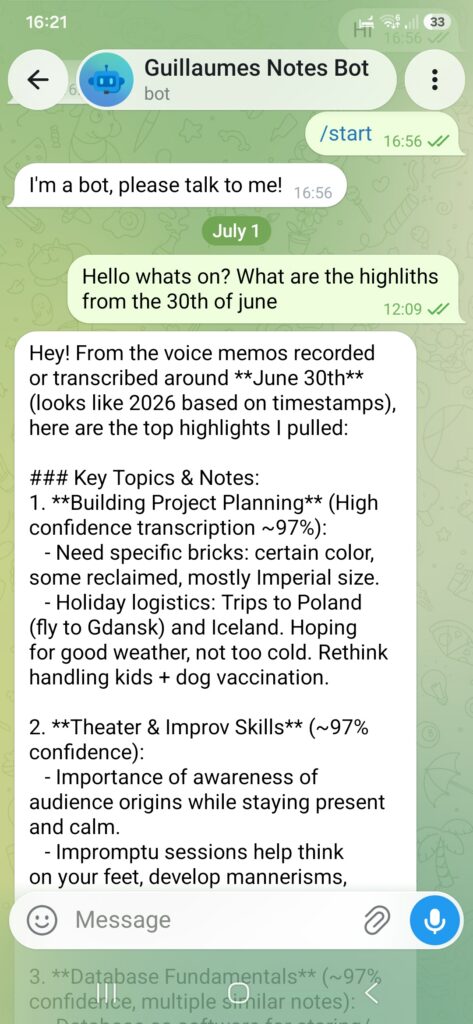
Since we are playing around with the services here, all I offer is an exploratory concept and I leave it up to you to make it enterprise ready if you wish to do so. Now let’s have a look at the architecture proposed to make this bot work.
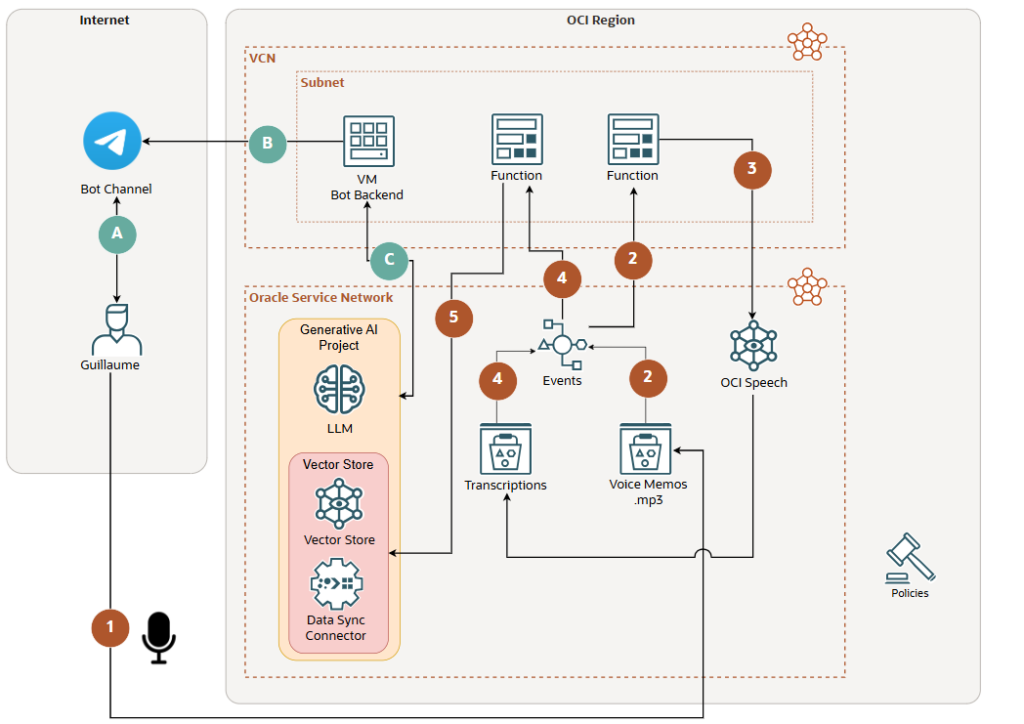
- The user uploads its voice recordings into Voice Memos bucket.
- Event service picks up an upload event in Voice Memos bucket, triggers a function adding all newly added recordings files into a list. My code is here.
- Function ships the list to OCI Speech for transcription, transcriptions are text files (.json files) and end up into the Transcriptions bucket.
- Event service picks up an upload event in Transcription bucket, triggers another function.
- Function launches a Data Sync job from the Data Sync Connector. The transcriptions are now being vectorised and the LLM can now “digest” these new memos. In other words they are added to its “knowledge”. Code snippet is here.
I use functions since they are easy to trigger in response to an event happening on the platform. From the chat app side, the objective is to reach out the Generative AI Project to leverage its “intelligence”, so we need to set-up the front end. You can use a pre-packaged frontend like Open WebUI or a chat App, I choose Telegram for its ease of use.
- A – User reaches the bot channel (You create a bot channel prior, follow this procedure here and use this link. WhatsApp is also an option but it wants a Facebook account which is a no-go from me).
- B – You need the bot backend. I use a VM instance and the instructions are available here and code is here, continuously polling from the Bot’s channel.
- C – I feed Guillaume’s Telegram user inputs to the Generative AI project endpoint and get the answer back into the channel, where the user expects an answer. (please see Image 1 above). The agent is able to call a list of tools, in this instance a single tool to call in the vector store to get the latest vectorised voice memos transcripts, check here.
def oci_gen_chat(entry):
    response = client.responses.create(
        model="xai.grok-4-1-fast-reasoning",
        input=entry,
        tools=[
            {
                "type": "file_search",
                "vector_store_ids": ["vs_phx_abc"]
            }
        ]
    )
    return response
This setup uses a Generative AI project “Build Agents with the OCI Responses API”, part of Enterprise AI Agents in OCI Generative AI and is a managed service. Documentation is available here and here. You can also launch your own deployment and resources with “Hosted Agentic Applications”.
If we look at the industry as a whole, data sovereignty and AI sovereignty is such a topic that to have the flexibility to chose deployment models, software building blocks, data region location and memory retention all from the cloud platform is handy. If data is of concern an obvious improvement is that Telegram is likely not the way to go, nor is Whatsapp, and I would recommend a front end under your control e.g. a VM running Open WebUI.
A few words and gotchas learned along the way:
- As usual, all calls from and to services on OCI need authorisation via IAM. This include Dynamic Group and Policies.
- It is mandatory to be familiar with the OCI SDK Authentication Methods so your code can make callouts to other services.
- Capture exceptions in functions with try-except blocks, plus logging and print(“your error”, flush=True) so can actually debug. I had many 403 and 404 errors related to lack of authorisation and wrong endpoints.
- Instead of editing your functions and redeploying with fn deploy repeatedly this way, use a local fn deploy, please see here.
- I use Cloud shell and the local storage and podman cache fills up quickly, you have to podman rmi $(podman images -q) from time to time, see here.
You got your bot now, hope this helps and see you soon!