Always assume the worst immediately! Fun story I got locked out from my Debian instance because of a bug in the distro update, and this did prevent me from logging in from SSH. To make matters worst I did not set-up user passwords at VM creation and hence could not to access the console from the serial connection… so there was no way for me to enter the instance and to troubleshot.
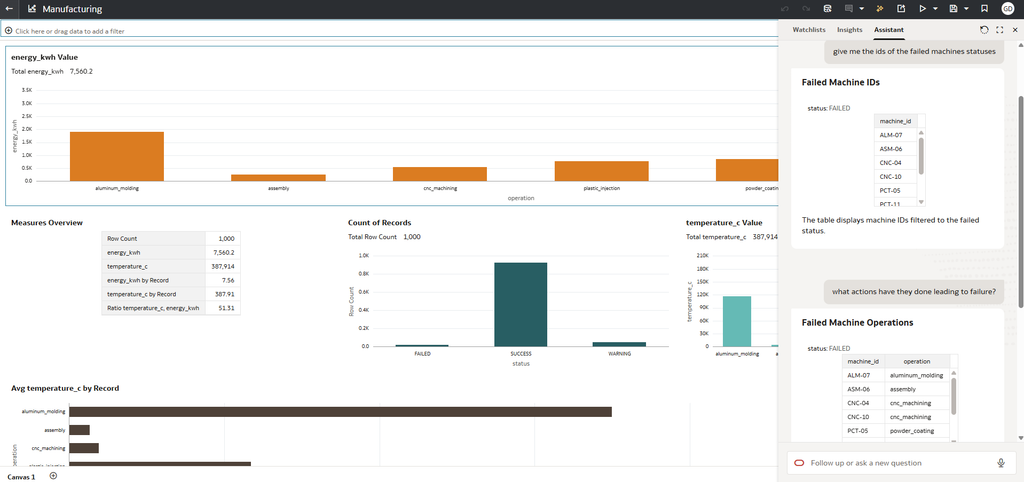
How can we cut through a large amount of information and get the business insight and answers we need? Data Operations team are familiar with this question and are used to make humongous amounts of logs actionable. Let’s build a visually appealing dashboard and augment it with an LLM chat capability ready to help the end-user further with natural language.
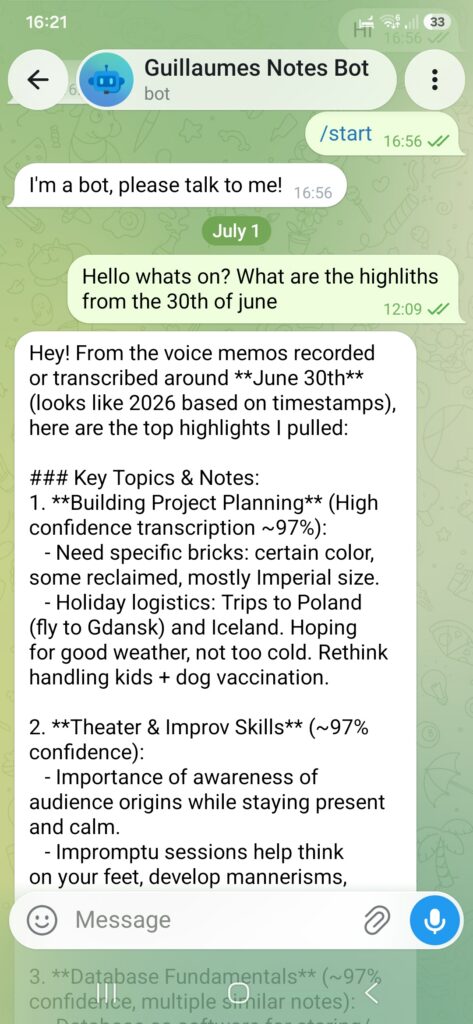
Let’s get the bot up on its feet and make use of the backend of our choice, in this instance a Oracle OCI Generative AI project. The bot needs to able to converse with the user (myself) via a chat app, it also needs to have a memory and be able to give me clues about my past memos. In addition, the bot knowledge is updated in real time as the user uploads voice notes day after day. The goal is simple, to automate note-taking from voice memos.
I ask the bot “What are the highlights for the 30th of June?” and it gives me key themes from my voice notes for that day. Equally I ask it if “Have I mentioned databases someday?” and it would answer with key excerpts from specific dates. You can now extrapolate and ask pretty much about anything on any date and the bot helps you remember. See below… (These are random voice notes)
In case you’ve ever launched, for example, an Oracle Linux Cloud Developer 8 image on OCI you have probably noticed that “dnf update” immediately fails with the following message.
That is because the image was created a while ago and comes out of the box with a small storage footprint. That’s an easy issue to resolve so let’s go to the bottom of it together in this guide. This guide applies to any image.
VPN is a hot topic with remarks ongoing about our privacy. Luckily we have several tools at our disposal to respond with, and VPN is one of them, but only one amongst many. It will make your traffic appear from a different location and IP, which is a huge plus. It does it by encrypting entirely your internet data between your physical location and the physical location of your VPN server, and it is the core of the issue for some.
You can visualise it as a ‘tunnel’ – you are visible at the entrance or when you exit but not in between.
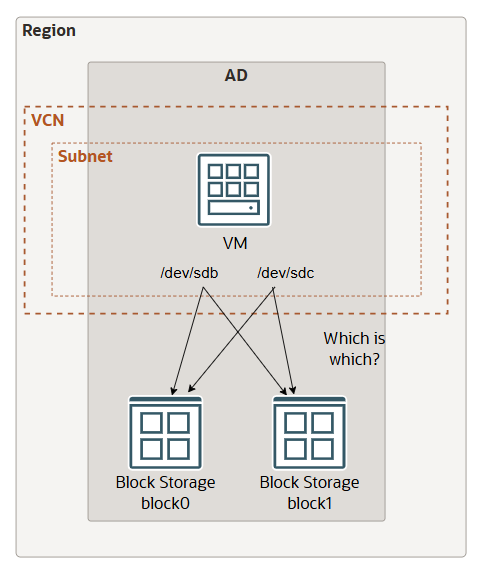
The other day, as I was clearing out storage on a VM and consolidating logical volumes into a lesser number of physical volumes, I ran into an issue where there was no way for me to identify to which cloud block storage my freshly freed /dev/sdc disk did correspond to… So how was I supposed to know which block to delete in the console and save money?
I have a scenario where I want to equip Windows machines with a local access to OCI Object storage files. We have to go about it in two steps, first we install s3fs, and second we install and configure samba. Our VM need to be able to access OCI resources and I recommend to use resource principals.
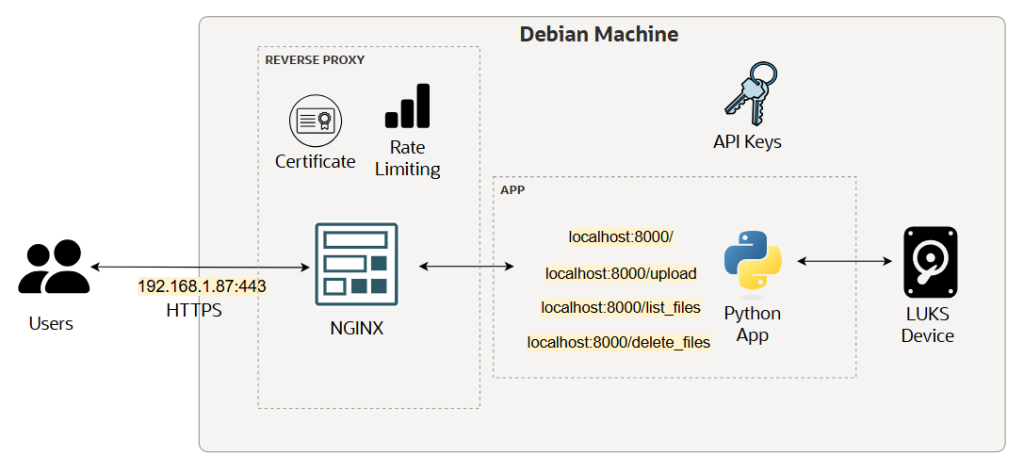
This time we won’t be using any cloud components as I want to show you the old way to do it, sort of speak, using a Linux VM. This example focuses on the following functionality: upload, delete and list, and to harden it to the extend I can. There are several ways to do it, but mine is as follows:
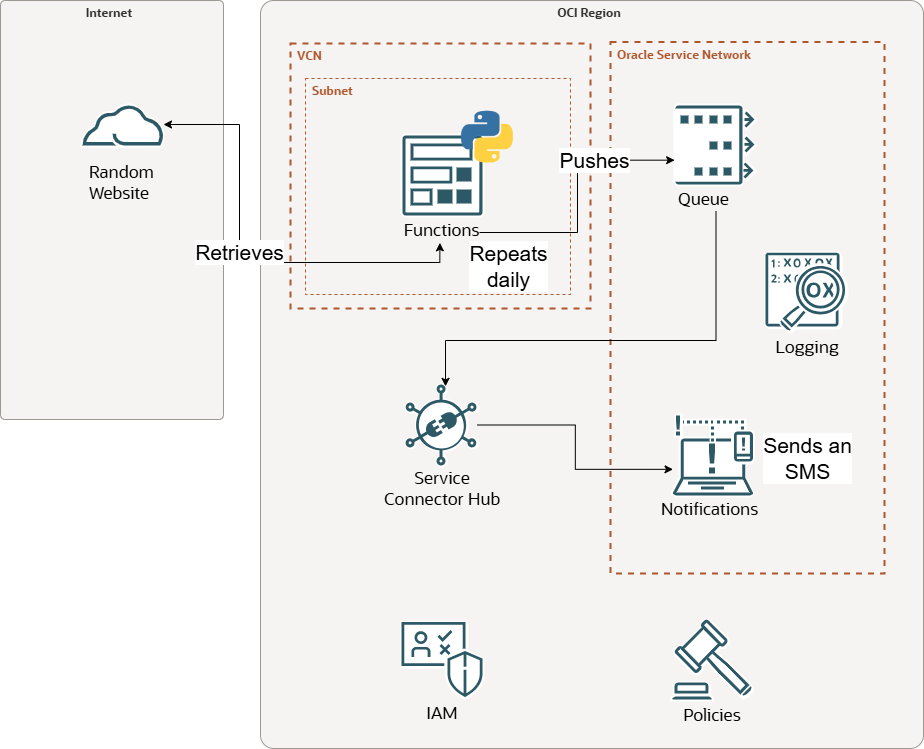
Every two weeks or so my bins get collected from home and there would be no issues if the schedule remained predictable… but it is not, and missing a collection date brings me an additional two weeks wait for refuse collection, and inevitably results in annoying trips to the dump to offload excess. I found myself checking the website way too often and I had to find a solution about it. Let’s have a look on how I could take advantage of the serverless OCI functions to repeatedly scrap the webpage to then send myself a daily SMS reminder. Here is what I propose: